CrowdSec Installation and Configuration Guide

CrowdSec is an open-source and collaborative security solution that protects servers, services, containers, and virtual machines. It analyzes behavioral patterns in system logs to detect malicious activities and automatically mitigates threats by blocking the sources of those attacks.
This guide will walk you through the installation, configuration, and initial setup of CrowdSec, including setting up a firewall bouncer and configuring SSH protection.
Why Use CrowdSec?
CrowdSec provides a unique approach to cybersecurity by focusing on behavior-based detection. Here are some key features:
- Behavioral Analysis: It analyzes logs to detect anomalies.
- Collaborative Defense: Shares threat intelligence with the community, making it stronger over time.
- Real-Time Protection: Automatically blocks malicious IPs based on the decisions made by the detection engine.
Step 1: Install CrowdSec
To begin, install CrowdSec using the official installation script. This script will set up the necessary repositories and install CrowdSec on your system.
curl -s https://install.crowdsec.net | sudo sh
Step 2: Update Your System and Install CrowdSec
After adding the CrowdSec repository, ensure your system package list is up-to-date and install the CrowdSec package.
sudo apt update && sudo apt install crowdsecThis command will install CrowdSec and its dependencies on your system.
Step 3: Understand Collections
Collections in CrowdSec are a group of parsers and scenarios tailored to protect specific services or environments. By default, CrowdSec comes with several pre-configured collections that can be customized to suit your needs.
Listing Available Collections
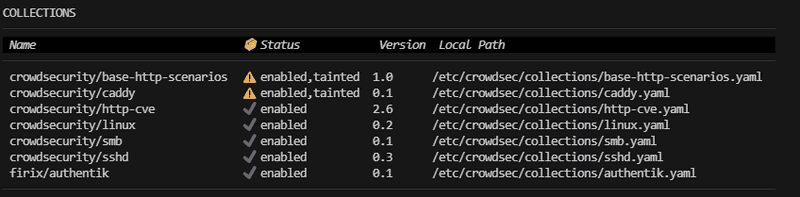
You can list all available collections using the following command:
sudo cscli collections list
This command will display a list of collections, including their descriptions and status.
Step 4: Install the CrowdSec Firewall Bouncer for iptables
A bouncer is a component that enforces decisions made by CrowdSec, such as blocking or throttling connections from malicious IPs. To protect your system, you need to install the firewall bouncer.
For iptables users:
sudo apt install crowdsec-firewall-bouncer-iptablesFor nftables users:
sudo apt install crowdsec-firewall-bouncer-nftablesThe bouncer will use your firewall to block malicious IP addresses identified by CrowdSec.
Verify Bouncer Installation
After installation, ensure the firewall bouncer is correctly set up by listing all installed bouncers:
sudo cscli bouncers listThis command should show the bouncer as active.

Step 5: Install and Configure the SSHD Collection
To secure your SSH service against brute-force attacks, install the crowdsecurity/sshd collection. This collection includes scenarios that detect and mitigate common SSH attacks.
Install the SSHD Collection
sudo cscli collections install crowdsecurity/sshdThis command installs the SSHD collection, enabling CrowdSec to monitor SSH activities on your server.
Configure SSHD Log Acquisition
Next, configure CrowdSec to monitor your SSH logs. Edit the sshd.yaml acquisition file to point to your SSH authentication log (/var/log/auth.log).
sudo nano /etc/crowdsec/acquis.d/sshd.yamlAdd the following content to the file:
filenames:
  - /var/log/auth.log
labels:
  type: syslog
---
Save and exit the file to apply the changes.
Restart CrowdSec
After configuring the log acquisition, restart the CrowdSec service to apply the new settings.
sudo systemctl restart crowdsecStep 6: Monitor and Verify CrowdSec's Operation
CrowdSec provides metrics that allow you to monitor its operation and effectiveness. Use the following command to view these metrics:
sudo cscli metricsThis command will display the number of logs processed, decisions made, and any potential errors.
Conclusion
By following this guide, you have successfully installed and configured CrowdSec on your server. You’ve set up a firewall bouncer to block malicious IPs and configured protection for your SSH service. CrowdSec will now actively monitor your logs, detect malicious behavior, and protect your system in real-time.
For more advanced configurations and community-driven scenarios, visit the CrowdSec Hub.